WordPress vBulletin Bridge & NextGEN Gallery Error

Posted in Technical, TechwareLabs on August 17th, 2010 by p14nd4

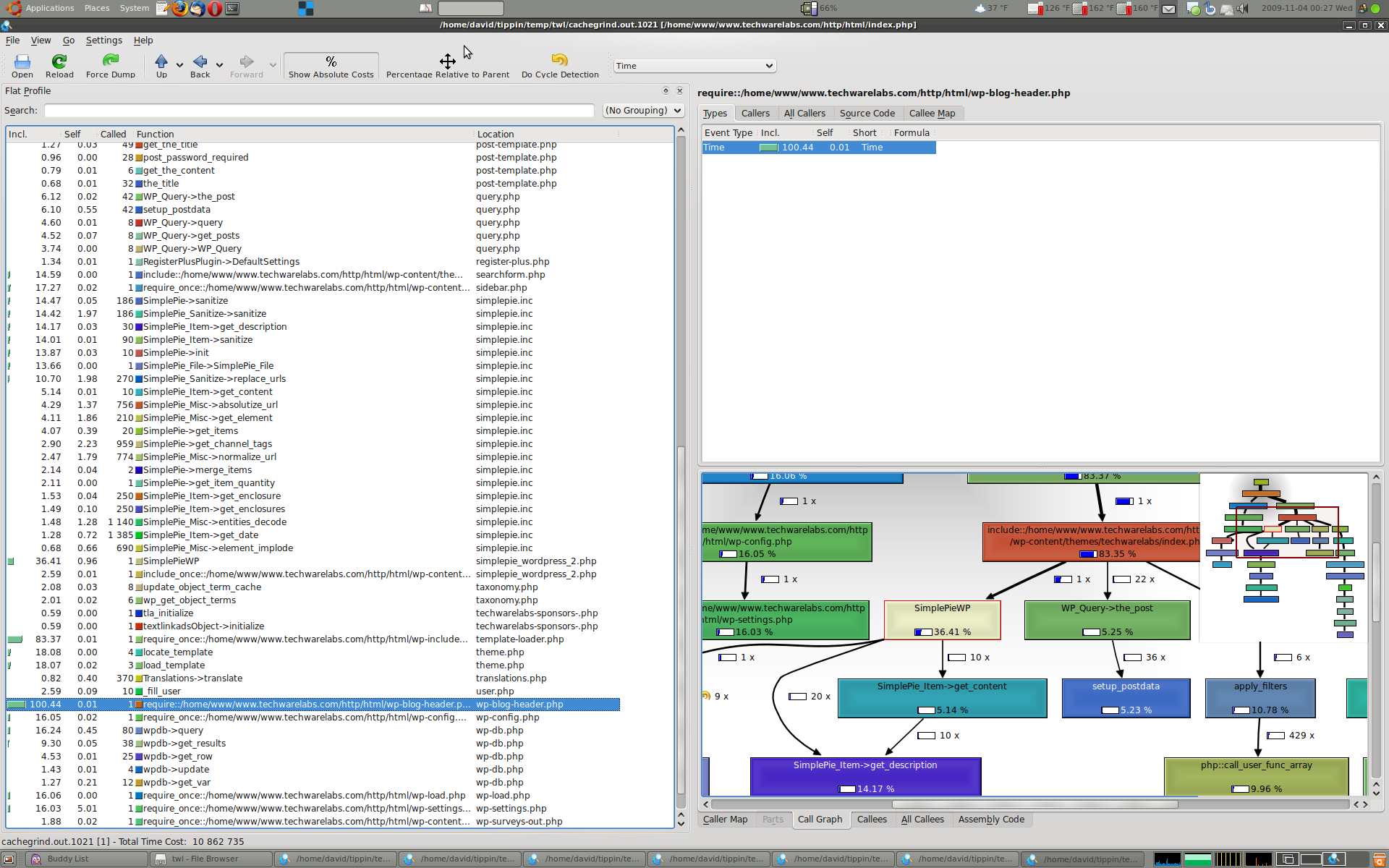
I’m the webmaster (and co-founder) of TechwareLabs, which gives me opportunities to play with some technology, software, and code that I otherwise likely wouldn’t have the motivation (or occasion) to pursue on my own. (This isn’t the main point of the post, but one of the coolest in recent history was using Xdebug profiling in PHP with KCachegrind to debug a performance problem on the live site. Flipped the profiler on for a few seconds, sent a few requests to the server, disabled the profiler, and loaded the output in KCachegrind to immediately get an awesome graphical overview of all the calls made to render the page, and how long they took. I don’t get to use fancy software like that at my day job, so this was very cool to use, and even cooler that it actually helped solve my problem so quickly.)
Anyway, back to the main point of this post! We’re currently working on an integration between the site backend (WordPress) and our forum software (vBulletin). I found a slick plugin for WordPress that’s supposed to accomplish most of this: Complete WordPress/Vbulletin Bridge and a guide explaining that vBulletin’s own utility, ImpEx, already has the ability to import users from WordPress. (Side note: ImpEx is available only to current vBulletin license holders, and can be downloaded from the same page where you can download vBulletin, after logging into the members area on their site. This wasn’t immediately apparent to me from reading that guide.) Woo! I can follow instructions!

Things went pretty smoothly, other than the hiccup I had trying to use the WordPress or WordPress CMS importers in vBulletin ImpEx. I eventually realized I had to click some start over link to get ImpEx to clear my session before I could continue with the BBpress importer, as the guide mentioned above recommended. Things seemed to be working pretty well in my testing, aside from a few pesky PHP errors about headers already being sent on some pages in the WordPress admin control panel, and a few slightly more concerning vBulletin-generated emails about insufficient database connections (yet to be resolved).

The bad news came when someone actually tried to publish a live article, and discovered that the Add media button for uploading images wasn’t working, and was instead presenting an error:

Are you sure you want to do this?

Please try again.

I poked around in media-upload.php, and first noticed that $_GET[‘inline’] wasn’t being defined, so I thought this was the problem. Not so fast! I guess the staff’s been using the NextGEN Gallery Plugin for WordPress, so this does something fancy for the media upload links, so that wasn’t the problem. My google-fu was apparently a little weak, since although I found other people reporting the issue immediately, I had to read through about twenty pages of the plugin thread before I found a solution (which, in retrospect, I wish I would’ve thought to check, myself, earlier).

User ‘skariko’ posted a [possible?] solution for folks having a problem with the WordPress flash-based image uploader, and while this wasn’t exactly what I needed, it was the Eureka! moment I needed to solve it, myself with a few keystrokes of modification. He suggested modifying the following line in vbbridge.php:
[code lang=”php”]#if (basename($_SERVER[‘SCRIPT_NAME’]) == ‘upload.php’) { return; }[/code]
to
[code lang=”php”]if (basename($_SERVER[‘SCRIPT_NAME’]) == ‘async-upload.php’) { return; }[/code]
I’m guessing that async-upload.php is the file that the flash uploader posts to, and for whatever reason needs to be unaffected by the vbbridge code. Anyway, I wasn’t even getting that far, so I just changed it to
[code lang=”php”]if (basename($_SERVER[‘SCRIPT_NAME’]) == ‘media-upload.php’) { return; }[/code]
and everything magically worked!

It turns out that someone else posted this exact same solution on another page of the thread, but I wanted to share it here, too, so maybe someone else in the future can have better luck googling for a solution (or in case I forget how I fixed it, and have to fix it again :-p).

Tags: ,

Late Summer / Fall 2008

Posted in General, Personal on April 1st, 2010 by p14nd4

In addition to hanging out a ton with existing friends, I also started meeting some new people. I joined OKCupid, at the recommendation of a friend, so met some folks that way (yes, it’s a dating site, and I did go on some dates, but didn’t really have the spark and excitement with any of those people that I need to date someone. I am happy to report that I am still friends with at least a couple people from there, though. Additionally, the fact that I was hanging out with everyone I knew meant that I met friends’ friends, too, including a few particularly noteworthy people: John K (met via high school classmate John B), Marta D (met via college friend Matt E), Rachael T (met via high school friend Courtney S), and Mary P (met via college friend Naomi K).

Read more »

Spring 2007 – Summer 2008

Posted in General, Personal, Travel on November 3rd, 2009 by p14nd4

Alright! I concede! I am never going to get this blog up to date at the rate I’m going / in the depth that I typically provide, so this is my compromise. I’m going to forgo looking back on email records, facebook messages, and photos, and just recap some of the major highlights that stick out in my memory, hazy though it may be. (Give me a break; this post starts with events that occurred over two years ago.)

Read more »

Of Motorcycles, Thunderstorms, and Eukaryotes

Posted in General on August 3rd, 2009 by p14nd4

Introduction

Well, I’m on one of my weekly conference calls with some of our engineers in India, and don’t need to completely pay attention all the time, so I decided to start writing a little. But, rather than writing something substantial (like the very necessary continuance of my life update since I left off in spring 2007, I think), this entry is going to basically be a hodgepodge of a few things that are, or have recently been, on my mind.

Read more »

Tags:

Life Changes (Part 2)

Posted in General on December 15th, 2008 by p14nd4

In case you’re just joining us, this post is a continuation of my first attempt to bring my blog up to date since my previous update left off in September, 2006 (about two years ago). I had to give up around 3 AM, and that only brought me through February, 2007 (five months), so I’ve still got a way to go. To pick up where I left off last night, I was explaining at the end of my post:

And at the very end of the month [Feb ’07], I apparently bit the bullet and bought the airplane tickets and hotel reservation for the vacation to Los Angeles, CA we planned for March.

Read more »

Life Changes

Posted in General on October 16th, 2008 by p14nd4

Wow … so I guess a lot has happened since the last time I wrote a personal entry in here. I could only begin to describe how daunting the task of trying to cover everything that’s happened since then is, and more than likely, I’m going to end up writing pages and pages of mundane details, while still managing to overlook major events. Such is the life of an infrequent blogger, though. As always, I feel somehow compelled to give a disclaimer at the beginning of my post: this is boring. You don’t want to read it. I write way too much, and you really don’t care enough to waste the next 15 (?) minutes of your life reading about my uninteresting one. Get out now, while you’re still ahead.

Read more »

VMware Server Hangs on ‘Mount ISO’ Browsing smbmount

Posted in Technical on March 24th, 2008 by p14nd4

Hahaha. So I’ll try to keep this brief, but I just wanted to post the problem I recently found with VMware Server (1.0.4, 1.0.5) on linux (perhaps others), and what I eventually found to be the cause and workaround.

Problem

Running VMware server on linux, I edit virtual machine settings, open the CD-ROM device, select Use ISO image, and Browse. I navigate to my smbmount (actually a cifs mount line in my /etc/fstab), and VMware hangs for about three or four minutes before displaying the contents of the directory. The following lines are written to /var/log/syslog:

Read more »

Ridiculous Account Requirements on SprintPCS.com

Posted in General, Technical on March 5th, 2008 by p14nd4

This is a break from my regular vein of [not] posting, but I’m livid enough that I need to write this. I’ve had SprintPCS cell phone service since 2003, and have been generally pleased with the service. It’s all subjective, of course, but I haven’t had real issues with dropped calls, and their data services (1xrtt, evdo) have been quite good to me. I log in to their web site regularly to check my account, pay bills etc, and it’s worked perfectly for the past several years. Apparently that was unsatisfactory for Sprint.

Read more »

Affiliate Summit West 2008 (part 1)

Posted in General, TechwareLabs, Travel on March 4th, 2008 by p14nd4

I got back less than 24 hours ago from the 2008 Affiliate Summit (West) in Las Vegas, NV, which I attended for the company I co-founded in 2001, TechwareLabs.com. Aside from being very tired every night after much more walking and standing than I’m used to, I was very pleased with the conference overall, and am optimistic about the upcoming months for my site. (I also happen to be pretty exhausted today, since my flight landed around 0030, which meant I got baggage around 0100, got home around 0140, got to bed around 0230, and then got up for my real job around 0730, since I decided to ‘sleep in’ an extra hour … but I want to try to get this down on paper the Internet while it’s still kind of fresh in my mind.)

Read more »

Ubuntu Feisty (7.04) + Compiz + Thinkpad T41

Posted in Technical on May 23rd, 2007 by p14nd4

Introduction

As some of you may know, I bought a refurbished IBM ThinkPad T41 (2373-5U2, iirc) during fall 2005, and have been dual booting it with Windows XP Professional and Ubuntu Linux. The hard drive is only 40 GB, which I partitioned as:

  • 26.5 GB Windows (NTFS)
  • 5 GB Ubuntu / (ext3)
  • 1 GB swap
  • 4 GB /home (ext3)
  • 3.5 GB unusable/recovery partition

Windows and Visual Studio 2005 Professional managed to eat up about 8 GB, plus another 1.2 GB for the installers I left on the hard drive, and miscellaneous other crap put the Windows partition near its capacity, and I had nearly 1 GB free on the Ubuntu / partition, but when it came time to upgrade to Feisty, I was informed that I needed over 1.1 GiB free. Even after some housecleaning, I still came up short, so I decided to wipe / and perform a fresh Feisty (Ubuntu 7.04) install. I figured I was probably about due anyway, since I’d been dist-upgrading since at least Breezy. The installation went fine (I did it during a meeting here at work), but when I went to enable “Desktop Effects” (compiz), I got some odd results. Actually, immediately after enabling it, the right section of the screen was displaying odd banded/corrupt artifacts (leftovers, I presume, from switching video modes, etc). I disabled the effects for the time being, and went about my life.

Fixing Compiz Display

As I noted above, I had problems getting Compiz working from Ubuntu 7.04 Feisty on my ThinkPad T41 with an ATI Mobility Radeon 7500 (01:00.0 VGA compatible controller: ATI Technologies Inc Radeon Mobility M7 LW [Radeon Mobility 7500]). One or two Ubuntu version ago, I had some OpenGL performance issues with xmoto (a game), which I kind of resolved by changing my xorg.conf file to explicitly use the ‘radeon’ driver instead of ‘ati’ and forcing AGPMode 2 (and maybe something else, I don’t remember for sure). I hoped that would solve my current problem, but alas, it did not. Perhaps resulting from my inability to accurately describe the results I was seeing, I was unable to immediately find any quick fixes to my problem. I guess that’s why it’s still beta, huh?

Update! I reinstalled Feisty (fresh) on my new laptop hard drive, and spent some time isolating the line that fixed the display rendering. It wasn’t the original line I thought, but rather:

Option "AGPSize" "32"

Fixing Compiz Performance

After getting compiz working, I was still getting weird performance hits, where I could hear my hard drive click, whirr, and see CPU spikes during really any display updates (even scrolling a man page in a gnome terminal window would spike the CPU). I thought this was somehow related to the new IDE device handling by the SCSI subsystem, and possibly not having the drive using DMA. I followed that hunch for a while, since it seemed that other people were indeed reporting issues of that nature in Feisty. The information I could glean from dmesg suggested that the drive was in fact in DMA mode, but during the course of the investigation, I noticed some questionable SMART values, so I decided that maybe my hard drive was just dying, and bought a replacement. However, I wasn’t entirely convinced that was the problem, so I kept poking around. I tried many combinations of options, but eventually found a winner. Again, I’m not 100% sure which line was the actual solution, but I think it may have been the following line in my Device section of xorg.conf:

Option "RenderAccel" "true"
Along the way I also modified my dric (/etc/dric or ~/.dric) to enable hyperz as follows (alternatively accomplished with the package driconf):

dric file
<driconf>
    <device screen="0" driver="radeon">
        <application name="Default">
            <option name="force_s3tc_enable" value="false" />
            <option name="no_rast" value="false" />
            <option name="fthrottle_mode" value="2" />
            <option name="tcl_mode" value="1" />
            <option name="texture_depth" value="0" />
            <option name="def_max_anisotropy" value="1.0" />
            <option name="no_neg_lod_bias" value="false" />
            <option name="texture_units" value="3" />
            <option name="dither_mode" value="0" />
            <option name="hyperz" value="true" />
            <option name="round_mode" value="0" />
            <option name="color_reduction" value="1" />
            <option name="vblank_mode" value="1" />
            <option name="allow_large_textures" value="2" />
        </application>
    </device>
</driconf>

Full xorg.conf Devicesection:

Full xorg.conf Device section
Section "Device"
        Identifier      "ATI Technologies Inc Radeon Mobility M7 LW [Radeon Mobility 7500]"
        Driver          "radeon"
        BusID           "PCI:1:0:0"
#       Option          "DisableGLXRootClipping"        "True"
        Option          "DRI"                           "true"
#       Option          "ColorTiling"                   "on" #already the default
        Option          "EnablePageFlip"                "true"
#       Option          "AccelMethod"                   "EXA" #prevents mine from loading
        Option          "XAANoOffscreenPixmaps"
        Option          "AGPMode"                       "4"
        Option          "AGPFastWrite"                  "on"
        Option          "RenderAccel"                   "true"
#       Option          "UseInternalAGPGART"            "no"
#       Option          "EnableDepthMoves"              "true"
#       Option          "GARTSize"                      "64"
        Option          "AGPSize"                       "32"
#or "64"
#       Option          "backingstore"                  "on"
#driconf -> Enable HyperZ for big improvement
#power saving:
        Option          "DynamicClocks"                 "on"
EndSection